-
butterknife插件
- 大小:0.04M
- 语言:简体中文
- 类别: 其它工具
- 系统:winall






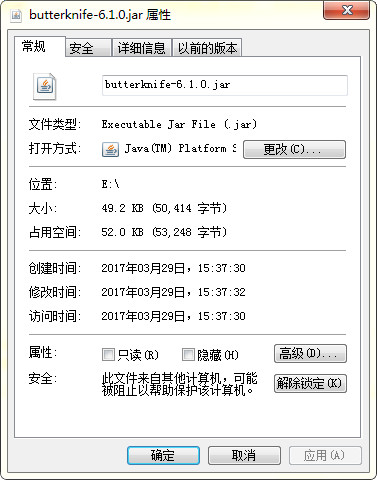
butterknife插件是用于android开发中,对于较复杂的布局使用注解技术,可以提高代码编写效率,是一个很好用的开源框架,给大家提供的是butterknifejar包,有需要的赶快下载吧!
使用方法
把下载下来的jar包,放到项目的libs下,就会自动导入项目了。
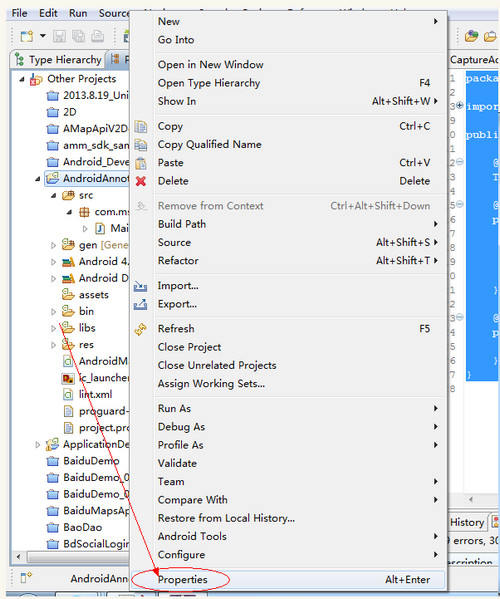
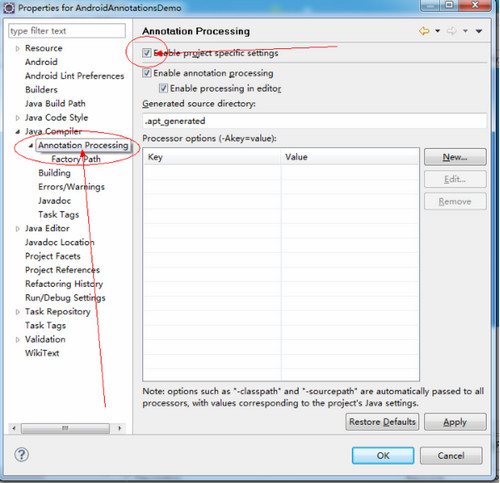
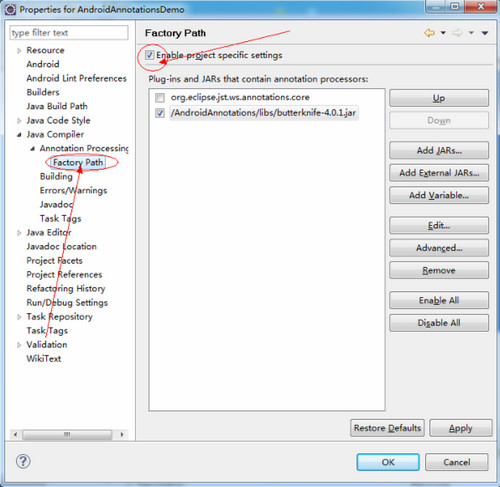
配置eclips,鼠标对准需要注解的项目,单击右键 poperties –>java Compiler –>
Annotation Procession –> 钩一下 Enable project specific settings 其它的就会自动钩上了
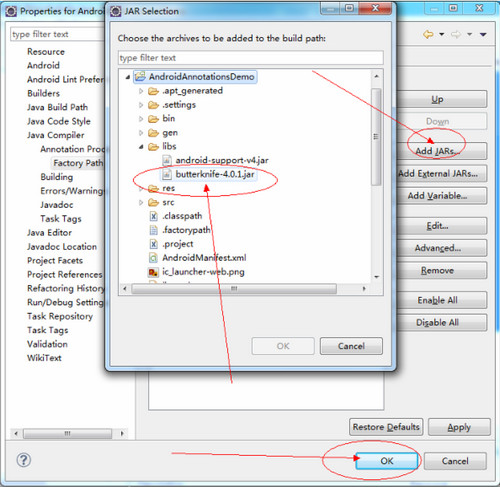
–> Factory Path ( 钩一下Enable project specific settings )–> 最后Add …. JARs 把刚刚下载的jar包来。这样eclips配置就可以了。
刚是用注解,直接上代码。
xml部分
<RelativeLayout xmlns:android="http://schemas.android.com/apk/res/android"
xmlns:tools="http://schemas.android.com/tools"
android:layout_width="match_parent"
android:layout_height="match_parent" >
<TextView
android:id="@+id/tv_test"
android:layout_width="wrap_content"
android:layout_height="wrap_content"
android:layout_centerHorizontal="true"
android:layout_centerVertical="true"
android:text="@string/hello_world"
tools:context=".MainActivity" />
</RelativeLayout>
java部分
package com.msquirrel.main;
import butterknife.ButterKnife;
import butterknife.InjectView;
import butterknife.OnClick;
import android.os.Bundle;
import android.app.Activity;
import android.widget.TextView;
public class MainActivity extends Activity {
@InjectView(R.id.tv_test)
TextView tvTest;
@Override
public void onCreate(Bundle savedInstanceState) {
super.onCreate(savedInstanceState);
setContentView(R.layout.activity_main);
ButterKnife.inject(this);
tvTest.setText("test");
}
@OnClick(R.id.tv_test)
public void sayHi() {
tvTest.setText("Hello!");
}
}
这样就算完成了,就可以使用注解了。
版本: v6.1.0官方版 | 更新时间: 2024-12-30
同类推荐





最新更新





Adobe Premiere Pro CS6怎么导入素材-Adobe Premiere Pro CS6导入素材的方法
Adobe Premiere Pro CS6怎么做局部马赛克-Adobe Premiere Pro CS6做局部马赛克的方法
Adobe Premiere Pro CS6怎么给视频加字幕-Adobe Premiere Pro CS6给视频加字幕的方法
Adobe Premiere Pro CS6怎么导入静态图片并进行5秒播放
idm下载器怎么设置User Agent-idm下载器设置User Agent的方法
idm下载器怎么设置文件默认下载位置-idm下载器设置文件默认下载位置的方法
butterknife插件评论
-
1楼 华军网友 2019-12-02 15:54:37butterknife插件很好用,谢谢啦!!
-
2楼 华军网友 2021-03-01 23:24:50butterknife插件整体感觉不错,还是挺满意的,安装运行很流畅!按照安装步骤指导来非常顺利!
-
3楼 华军网友 2021-06-24 03:12:26butterknife插件还不错,下载非常快,送你个好评!